Ten apps. One sign-in. Every tenant.
One Microsoft 365 suite for MSPs and IT teams. AI-native: one MCP server lets your AI assistant work across all of it, down to fixing a PC with no one at the keyboard.
Headless PC support. Your AI diagnoses, triages, and fixes.
Hand your AI assistant the ticket. Through Accred Connect it finds the person’s PC or Mac, runs the diagnostics, applies a reviewed fix, checks that it worked, and writes up what it did. On computers approved for unattended help, no one needs to be at the keyboard.
Patent pending in the US for Connect’s agentic IT support
Ticket Outlook keeps crashing on Dana’s laptop.
- Found deviceDana’s laptopWindows 11 · online
- Asked for consentDana allowed the sessionApproved
- Ran diagnosticsEvent log, crashes, Office health9 Outlook crashes today
- Applied fixThe reviewed Office repairCompleted
- Checked againOutlookNo new crashes
- Wrote it upTicket notes, session endedLogged
- DiagnoseEvent logs, crashes, BitLocker, Defender, Intune, Office, and the network on a PC; crashes, disk, FileVault, updates, and the network on a Mac.
- TriageEvery command is risk-classified first. The assistant picks the right check and says what it found.
- FixReviewed fixes it can undo, or PowerShell or zsh when needed. High-risk jobs wait for a technician or admin to approve.
- Verify and reportIt runs the checks again to prove the fix held, then writes it up. Every step lands in the audit log.
You stay in control: your organization sets what AI assist may do, high-risk fixes wait for a technician or admin to approve in Connect, and every step is in the audit log. For Windows PCs and Macs.
IT help where your people already ask.
Someone mentions Accred IT help in a Teams channel, or posts in a linked Slack channel, in their own words. It finds their computer in Accred Connect, asks a quick follow-up when the request is vague, runs safe checks, and answers in plain words.
- Finds the right computerFrom the device owner links in Accred Connect. If it can’t tell which PC, it asks, and shows the person how to find its name.
- Runs safe checksHealth, what’s slowing it down, storage, temperature, crashes, and the internet connection.
- You decide which fixes need an OKFixes follow your AI assist policy; the ones you choose wait for a technician to approve in Connect. The person gets a plain answer, and your technician gets the technical notes, a Consult ticket, and an alert.
- Set up in minutesIn Hub Settings: Teams takes three steps and one link code; for Slack, add the app and pick a channel.
Someone posts: my computer takes forever to start and everything is slow. Accred IT help finds their computer, connects, and checks what is slowing it down, power, temperature, and overall health. It says the hardware looks healthy, but Steam and the Riot game launcher open every time the computer starts, and asks whether it can stop those two from opening at startup. The person replies: yes please, go ahead. It fixes it and replies Resolved: it stopped both from opening on their own, they can still be opened any time, and asks the person to restart once and say so if startup still feels slow.
Every app, one window.
Real screens with sample data. Pick an app, or let the tour play.
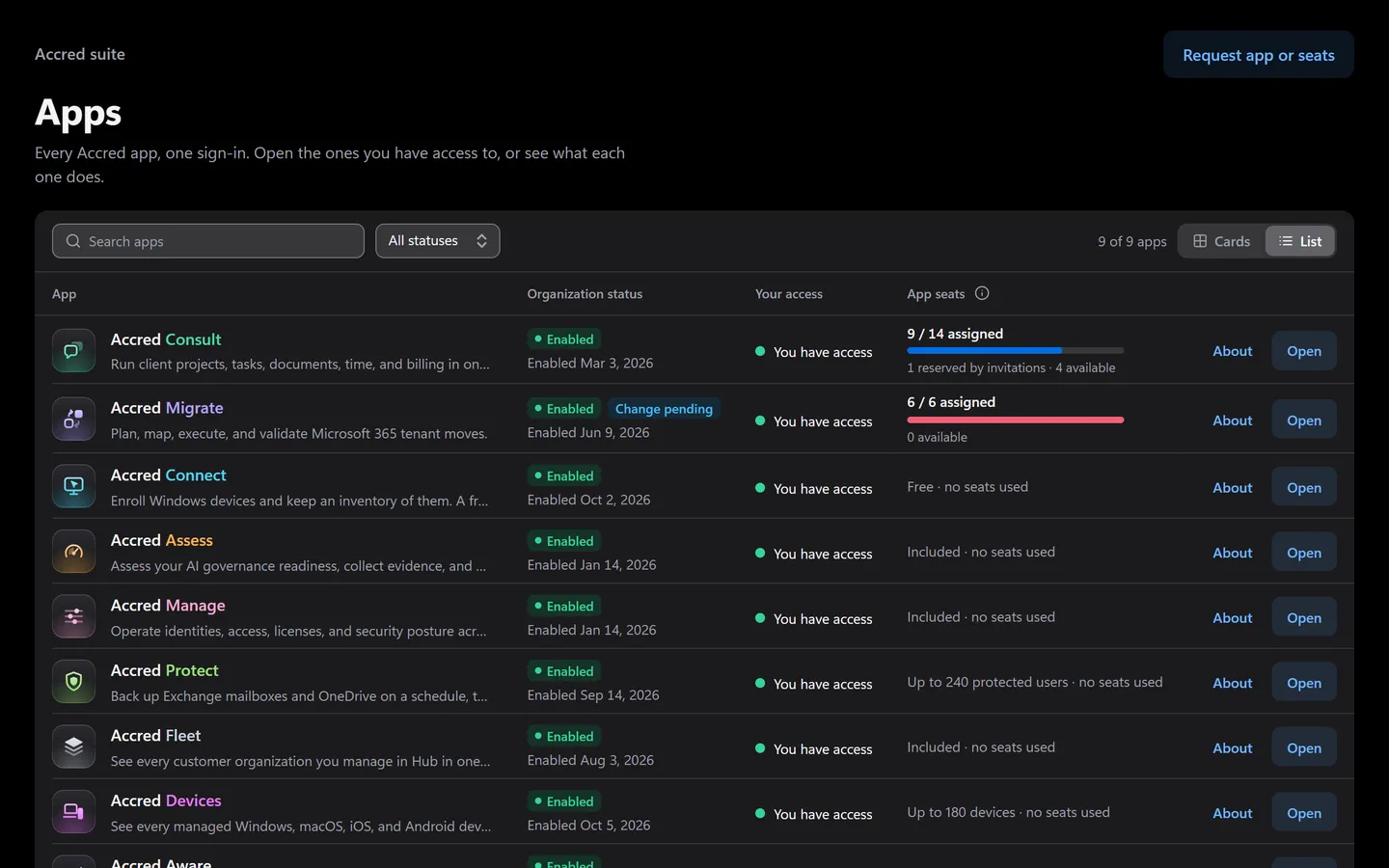
Accred HubSuite sign-in, access, and billing
- Every app’s status for your organization
- Your access in each app
- App seats in one place
See the apps at work.
IT help in Teams and Slack, a technician taking over, and one AI assistant.
Your AI, across every app you can open.
One MCP server for the whole suite, on the open Model Context Protocol. Connect the AI assistant you already use, sign in with Hub, and ask in plain language. It can do what your account can do, and nothing more.
Works with Claude today, and with other AI assistants that support remote MCP connectors with OAuth sign-in.
https://hub.accredproducts.com/api/mcp- The connectionYou choose Read only, or Read and make changes, when you connect.
- Your organization’s policyOwners and Admins choose which apps assistants can use and what they may change.
- Your Hub accessOnly the apps you can open in Hub, checked live on every request.
- The app’s own rulesYour role in that app and its admin-locked settings, exactly as in the app.
 Your AI assistantExample conversation · Accred connector
Which of my client tenants drifted from our baseline this week, and how bad is it?
Worked in Accred · 5 steps
- Checked drift across every tenant you manage
- Ranked findings the drift by severity
- Read the finding the riskiest change
- Listed changes what changed around it
- Proposed the fix, and asked before changing anything
Three tenants drifted. Fabrikam is the one to look at: legacy sign-in was turned back on for 14 accounts on Tuesday. Northwind and Tailspin have two medium changes each. Want me to put Fabrikam back on the baseline?
Free to start. Pay only for the work you run.
Hub is free and opens every app. Turn on only the apps you need: each has one price, or none. Paid apps start with a 30-day free trial and no card.
- Accred HubSuite sign-in, access, and billingFree
- Accred ConsultLive delivery, support, and approval workflows$15per seat per month
- Accred MigrateMicrosoft 365 tenant-to-tenant migration$5per migrated object, once
- Accred ConnectRemote support and AI-assisted fixes for Windows PCs and Macs$29.99per seat, with Consult
- Accred AssessAI governance readiness assessmentFreeexpanded report extra
- Accred ManageMicrosoft 365 tenant administration and governanceFree
- Accred ProtectMicrosoft 365 backup and restore$2.50per protected user per month
- Accred FleetOne view across every customer tenantFree
- Accred DevicesIntune device management for client tenants$1.50per managed device per month
- Accred AwarePhishing simulation reporting$0.50per reported user per month
- Accred AutomateWorkflow automation across client tenantsFree
Free: Hub and Fleet for everyone, Manage for every role except Viewer, and the free Assess assessment. Save 20% billed annually. 15% off when you pay for 2 or more of Consult, Devices, Protect, and Aware. Enterprise: Pay by card in Hub up to the card limit; above it, or to pay by invoice, request a quote in Hub.
Questions
What is Accred?
Accred Hub plus ten web apps for Microsoft 365 consultants, MSPs, and IT teams, all behind one sign-in.
- Run client delivery and support in Consult, and move tenant to tenant with Migrate.
- Enroll Windows PCs and Macs with Connect, check AI governance readiness with Assess, and administer a tenant and find license savings with Manage.
- Back up Exchange Online and OneDrive with Protect ($2.50 per protected user per month), and turn a client’s Intune data into findings with Devices ($1.50 per managed device per month).
- See Microsoft Defender phishing simulations and training across client tenants with Aware ($0.50 per reported user per month).
- See every customer organization with Fleet, free.
- Each paid app has a 30-day free trial with no card. Accred Consulting builds and supports the suite.
Which Accred apps are available today?
All of them open in Hub today, and each product page says plainly what works today.
- Live: Hub, Consult, and Manage.
- Assess is open to anyone as a free advisory assessment.
- Connect comes with Consult + Connect seats. Migrate works today.
- Fleet is free and lists your customer organizations while its other data sources are not connected yet. License orders in Manage are simulated for now.
- Protect, Devices, and Aware are open in Hub, each with a 30-day free trial.
How much does Accred cost?
Start free. Paid apps are priced per seat, user, device, or migrated object, with no minimum.
- Free: Hub and Fleet for your whole team, and Manage for every role except Viewer.
- Assess is free to start, with an expanded assessment at $99 one-time per organization.
- Consult is $15 per seat per month, $12 from seat 11, or Consult + Connect $29.99 per seat per month, $26.99 from seat 11, with Connect agents on unlimited computers.
- Protect is $2.50 per protected user per month, Devices $1.50 per managed device per month, and Aware $0.50 per reported user per month.
- Migrate has no seats: every member can open it, and you pay $5 per migrated object, once, with no data caps.
- Annual billing saves 20%, and each subscription app has a 30-day free trial with no card.
- Suite bundle: an organization paying for any 2 or more of Consult, Devices, Protect, and Aware gets 15% off those subscriptions. It stacks with annual billing and never applies to Migrate objects or Assess. Connect does not count toward the 2 apps, but the Connect add-on is discounted too when the bundle applies.
- Pay by card in Hub up to the card limit; above it, or to pay by invoice, request a quote in Hub.
Can I try Accred without talking to sales?
Yes. You can start on your own today.
- Run a free Accred Assess readiness assessment, no account needed.
- Or create your organization in Accred Hub. You become its Owner and turn on the apps you want.
- Turning on Consult starts a 30-day free trial right away, with no card.
- Migrate is free to turn on and charges only per migrated object. Connect has a 30-day free trial for up to 5 technicians.
- Invite your team by email from Hub, or with a shareable invite link.
How does sign-in work across the apps?
Sign in once, to Accred Hub, and every app opens from there.
- Hub checks your organization membership and each app’s access rules, then opens the app with single sign-on.
- Every app’s top bar shows Hub and your organization’s apps as tabs, and the All apps menu lists every Accred app.
- An app you can’t open stays listed, with the reason.
Is Accred Assess a compliance certification?
No. Assess gives advisory AI governance readiness, not a certification.
- It measures readiness against the decisions you record.
- Framework views such as HIPAA, SOC 2, and NIST AI RMF show readiness only: not compliance, legal assurance, or certification.
Does Accred change my Microsoft 365 tenant?
Only where an app says so, and only after the change is reviewed.
- Assess discovery is read-only.
- Manage shows the tenant and the effect of an action before it runs, and logs every change. Single changes, such as removing a group member, run after a confirmation.
- Onboarding, offboarding, and access-review removals need a second owner or administrator to approve.
- Migrate scans, prechecks, and validation are read-only and never write to the destination tenant.
- Migration runs copy data into the destination tenant. Migrate changes the source tenant only through the Cutover steps an operator chooses to run.
Does this website collect my data?
Very little: page-view counts, and what you type into the setup assistant if you use it.
- No cookies and no advertising tags.
- Cloudflare Web Analytics counts page views and measures page speed, without cookies and without tracking you across sites.
- The optional setup assistant sends your questions to Anthropic, PBC to write answers. Accred does not store the conversation, and Anthropic deletes it within 30 days.
- Sign-in and product data are handled by Hub and each app under their own notices.