
Accred Aware

Phishing simulations, with the trend that matters.
Accred Aware is an app for MSPs whose clients use Microsoft Defender for Office 365 Attack simulation training.
Works with your AI assistantOpen in Hub, priced per reported user
$0.50 per reported user per month, or $0.40 billed annually ($4.80 per reported user per year). No minimum. A reported user is anyone in a connected client tenant’s attack simulation reports. The card limit is 5,000 reported users. Pay by card in Hub up to the card limit; above it, or to pay by invoice, request a quote in Hub. The 30-day free trial has no cap on reported users and needs no card. An Owner or Admin starts it in Hub. Owners, Admins, and Members can open it; Viewers cannot. An Owner or Admin connects each client tenant through the client’s admin consent to Aware’s own Microsoft Entra app. Sample clients work too, so anyone can try Aware without a tenant. Each client tenant needs Microsoft Defender for Office 365 Plan 2, which is included in Microsoft 365 E5.
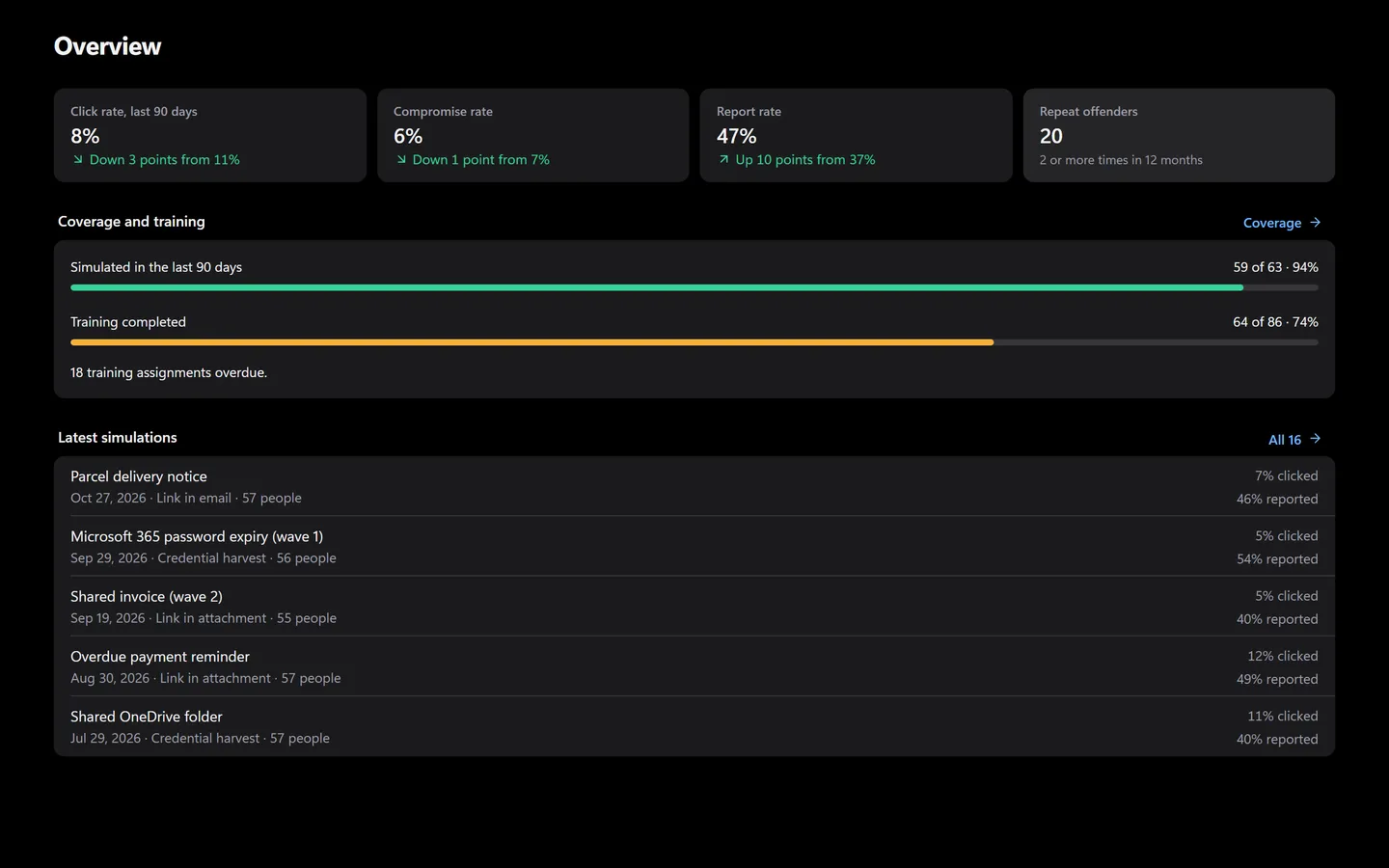
Prefer to click? It’s all in the app too.
Everything the assistant does has a screen. Shown with sample data.
- The last 90 days against the 90 before
- Repeat offenders and training coverage
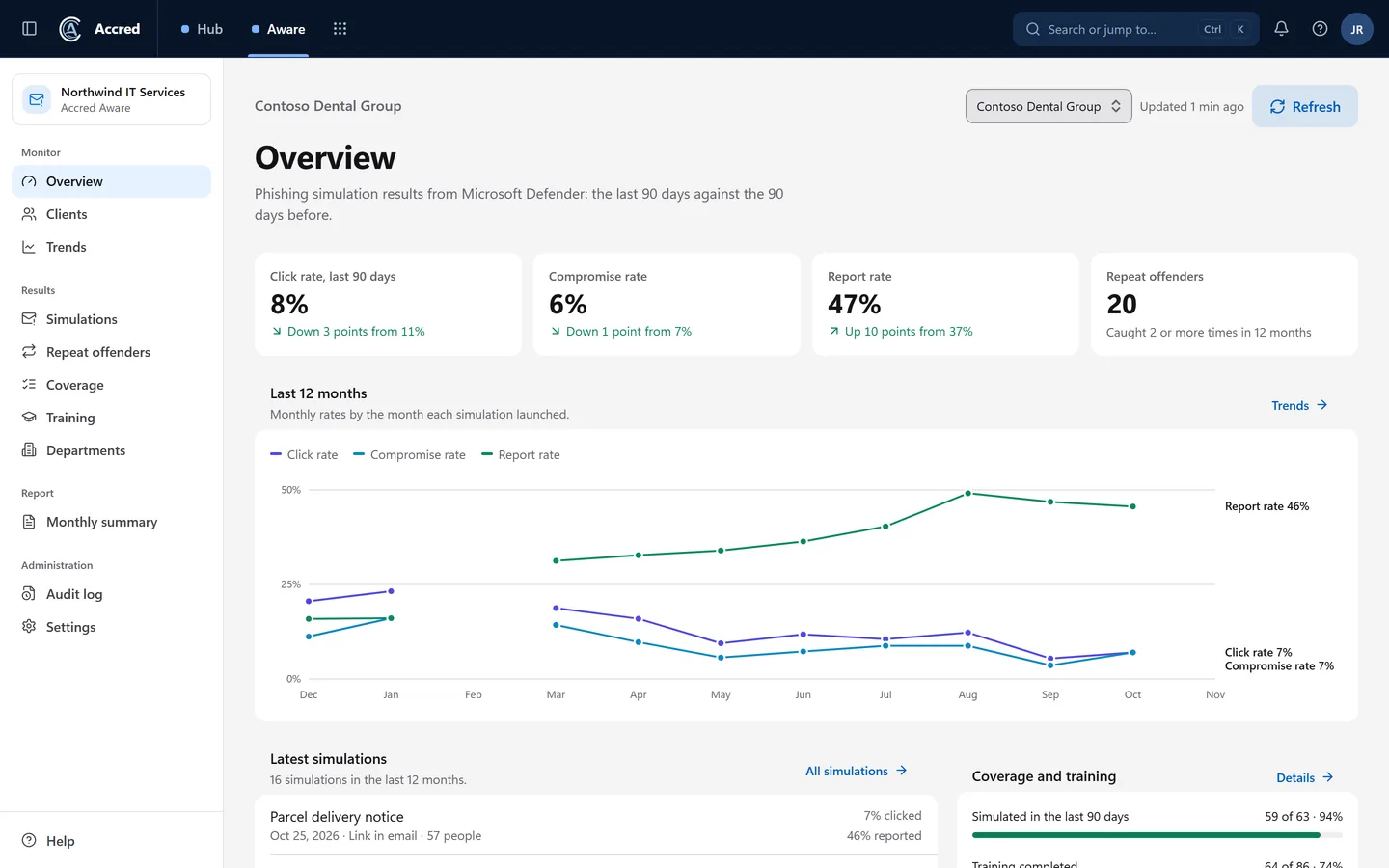
What Aware does today.
Every client tenant side by side: click, compromise, and report rates, last 90 days against the 90 before
Repeat offenders, simulation and training coverage, and training completion for each client
12-month trends as a chart or a table, and results by department
A plain-English monthly summary for each client, CSV on every table, and an audit log
Launch, schedule, or draft Microsoft’s own simulations for a client, then track or cancel them
Let the agent do it. You stay in charge.
Ask how people did, then plan the next round. Launches wait for your yes.
- You
How did Contoso do last quarter? Plan the next round.
- Checked trendsClick and report rates, 90 days
- Planned a programA program, planned
- Created draftsDrafts created
- Proposed changeLaunch the programYou said yes
- Launched the programProgram launched
- Assistant
Here is last quarter’s trend, and the next round is launched.
- Ask
- Investigate
- Approve
- Done and logged
Aware audit log
- Drafts created
- Program launched by you, via your assistant
An example with sample data.
Safe to hand over. Your rules, your access, your log.
Security- Your access, nothing moreYour assistant can do what your account can do. Hub checks your role on every request.
- A yes before changesYou choose Read only, or Read and make changes, when you connect. Changes check with you first.
- Logged as youEvery change is recorded in the app’s audit log as made by you, via your assistant.
- Microsoft consent firstNothing connects to a tenant until an administrator grants Microsoft consent.
What Aware shows
- Every client tenant side by side, with click, compromise, and report rates for the last 90 days against the 90 days before.
- Repeat offenders: people caught by two or more simulations in the last 12 months.
- Simulation coverage and training coverage: who has been sent a simulation, and who has been assigned training.
- Training completion for each client.
- Trends over 12 months, as a chart or a table. Aware keeps the monthly figures itself, so the history is there when you need it.
- Results by department.
- A CSV export on every table, links to each client’s Microsoft Defender portal, and an audit log of what people did in Aware.
Each Accred organization can connect up to 100 client tenants. Aware reads each client again on a schedule, and Refresh on any page reads it now.
Launch Microsoft’s simulations from Aware
Owners and Admins can launch Microsoft’s own simulations for a client from Aware: choose one of Microsoft’s payloads, who receives it (all users, the client’s repeat offenders, or people you list), Microsoft’s training, and a start time, then launch it, schedule it, or save it as a draft. Aware asks Microsoft Defender to run it, shows its status, and lets you cancel it.
- Pick the technique and one of Microsoft’s own payloads.
- Choose who receives it: all users, the client’s repeat offenders from Aware, or people you list.
- Assign Microsoft’s training, or none.
- Start it now, schedule it, or save it as a draft that sends nothing.
- Follow its status from Microsoft under Launched from Aware, and cancel it there. The audit log records each launch with the number of recipients, not their addresses.
Launching needs the optional AttackSimulation.ReadWrite.All permission in the client’s admin consent. Reports work without it. A client that consented before that permission existed shows that it hasn’t allowed launching yet, with Reconnect client; its reports keep working.
With sample clients, nothing reaches Microsoft and nothing is sent: Aware follows a sample launch on its own clock.
A monthly summary for each client
For each client, Aware writes the month’s results in plain English, ready to send to the client. Copy it, print it, or export its figures as CSV.
Repeat offenders are not named in the summary unless you turn names on for that summary.
What Microsoft Defender does
Microsoft Defender runs every simulation: it sends the email, hosts the login and landing pages, sends the notifications, and assigns the training. Aware sends no email itself, builds no payloads, hosts no pages, and captures no credentials.
Aware does not replace Microsoft Defender. The simulations, payloads, pages, and training are Microsoft’s; Aware launches Microsoft’s simulations and reports on them across your client tenants.
What each client tenant needs
Each client tenant needs Microsoft Defender for Office 365 Plan 2, which is included in Microsoft 365 E5. Without it, Microsoft has no attack simulation data for Aware to read, so Aware shows a clear “not available” state with the requirement instead of an error.
Launching needs the optional AttackSimulation.ReadWrite.All permission in the client’s admin consent. Reports work without it.
Removing a client from Aware deletes everything Aware stored for it.
Why Aware, when Defender has reports
Microsoft’s own Attack simulation training reports, and its tools to launch simulations, come with Defender for Office 365 Plan 2 at no extra cost, and they work well for one tenant. Aware is the multi-tenant layer for MSPs: one view across every client instead of one Defender portal per tenant, trends that Aware keeps, a client-ready monthly summary, CSV export, and Microsoft’s simulations launched for any client from the same place, all inside Accred Hub.
If you look after a single tenant, Defender’s own portal may be all you need.
Questions about Aware
Is Accred Aware available?
Yes, in Accred Hub. The 30-day free trial has no cap on reported users and needs no card.
- An Owner or Admin starts it in Hub.
- An Owner or Admin connects each client tenant through the client’s admin consent to Aware’s own Microsoft Entra app.
- Sample clients work too, so anyone can try Aware without a tenant.
Does Accred Aware send phishing emails?
No. Microsoft Defender runs every simulation: it sends the email, hosts the login and landing pages, sends the notifications, and assigns the training.
- Aware sends no email itself, builds no payloads, hosts no pages, and captures no credentials.
- When an Owner or Admin launches a simulation from Aware, Aware asks Microsoft Defender to run it.
Can I launch simulations from Accred Aware?
Yes. Owners and Admins can launch Microsoft’s own simulations for a client from Aware: choose one of Microsoft’s payloads, who receives it (all users, the client’s repeat offenders, or people you list), Microsoft’s training, and a start time, then launch it, schedule it, or save it as a draft.
- Aware asks Microsoft Defender to run it, shows its status, and lets you cancel it.
- Launching needs the optional AttackSimulation.ReadWrite.All permission in the client’s admin consent.
- Reports work without it.
What does each client tenant need?
Each client tenant needs Microsoft Defender for Office 365 Plan 2, which is included in Microsoft 365 E5.
- Without it, Aware shows that attack simulation data is not available, and why.
How much does Accred Aware cost?
$0.50 per reported user per month, or $0.40 billed annually ($4.80 per reported user per year).
- No minimum. A reported user is anyone in a connected client tenant’s attack simulation reports.
- The card limit is 5,000 reported users.
- Pay by card in Hub up to the card limit; above it, or to pay by invoice, request a quote in Hub.
Does Accred Aware replace Microsoft Defender’s reports?
No. Defender’s own reports are free with Plan 2 and good for one tenant.
- Aware puts every client in one view, keeps 12 months of trends, and writes a monthly summary for each client.
- The data and the training stay Microsoft’s.
Further reading
Every guide- Microsoft 365 software for MSPsWhich MSP jobs Accred covers today, from client delivery and migrations to tenant administration, backup, and licensing, and what is not there yet.
- Accred FleetAccred Fleet lists every customer organization in one view for MSPs. Free for every Accred organization; health, GDAP, and drift are not connected yet.
- Accred documentationQuick starts for Hub and all ten Accred apps: create your organization, then set up each app. Plus roles, seats, access, and help.
Sources
- Get started using Attack simulation training · Microsoft Learn
- Reports for Attack simulation training · Microsoft Learn
- Simulate a phishing attack with Attack simulation training · Microsoft Learn
What Aware costs.
$0.50per reported user per month
| Term | Price |
|---|---|
| Monthly | $0.50 per reported user per month |
| Billed annually | $0.40 per reported user per month ($4.80 per reported user per year) |
| Minimum | None |
| Who counts | A reported user is anyone in a connected client tenant’s attack simulation reports. |
| Free trial | 30 days, no cap, no card |
| How to buy | By card in Hub, up to 5,000 reported users; above that, or to pay by invoice, a quote requested in Hub |
When a trial ends without a plan, an Owner or Admin starts a plan in Hub. Hub is free.
Create your organization, then open Aware.
Aware starts with a 30-day free trial with no cap on reported users and no card. Then it is $0.50 per reported user per month, or $0.40 billed annually. Hub is free.