

Remote support for Windows PCs and Macs: take control, fix Windows PCs in the background with Shadow, and let AI assist do the routine work, with high-risk fixes approved in Connect.
What works today
Connect is sold with Consult as Consult + Connect seats, with a 30-day free trial; agents install on unlimited computers at no charge. The installers are not yet code-signed: Windows shows an unknown-publisher warning, and macOS may ask you to confirm the Mac installer. Shadow is Windows only. Online status and inventory come from signed device check-ins.
Let the agent do it. You stay in charge.
Someone asks for help in Teams or Slack, or a technician hands the ticket to their assistant. It finds the computer, works out what is wrong, fixes it with a yes from the right person, and writes it up.
Patent pending in the US for Connect’s agentic IT support
- Dana
Outlook keeps crashing on my laptop.
- Found deviceDana’s laptop · Windows 11 · online
- Asked for consentDana allowed the session
- Ran diagnosticsOutlook crashing since this morning
- High-risk fix: needs a technicianRepair Microsoft 365 Apps (quick repair)Approved by Sam, technician
- Applied fixOffice repair completed
- Ran diagnosticsNo new crashes
- Wrote ticket notesTicket notes written
- Accred IT help
Resolved. Outlook is working again. Reply here if it crashes again.
- Ask
- Investigate
- Approve
- Done and logged
Connect audit log
- Dana allowed the session
- Office quick repair approved by Sam
- Office quick repair completed
- Ticket notes written
An example with sample data. For Windows PCs and Macs.
Built for a real help desk. People, technicians, and AI on one ticket.
From the help desk to the device
People ask in Teams or Slack. Connect finds their computer, asks them before it touches anything, and your team sees every step as a ticket.
Approve it. Undo it.
High-risk fixes wait for a technician or admin to approve in Connect. When a fix didn’t help, many can be put back in one step.
Several technicians, one computer
On a Windows PC or a Mac, from Windows or the Mac technician app. See who is connected, since when, live. Pass control back and forth, join to watch, and let Owners and Admins end a session.
Access sessions stay up
An unattended access session can’t be cut off from the computer mid-fix. An administrator can still end it.
Accred Shadow. Fix it without taking over.
Shadow works in the background, so your people keep working. No pop-ups, no waiting, no handing over the mouse. Your technician gets a private Windows workspace on the same computer, with its own taskbar and admin tools, and can switch to the person’s screen in the same session if it’s needed.
Nobody is interrupted
They don’t stop, wait, or hand over the mouse. You restart a service, check a log, or run PowerShell while they carry on.
Off until an admin approves it
Shadow is off by default. An Owner or Admin turns it on per device, and only on devices with unattended access.
On the record
Every Shadow session is recorded with the technician’s name.
Even at the sign-in screen
Works on Windows with nobody signed in, and after a restart.
Included with every Connect seat. Windows only.
What Connect does today.
Take control
View and control a Windows PC or a Mac, from Windows or the Mac technician app, with several technicians in one session. Pick a monitor or see them all, pass control back and forth, join to watch, and let Owners and Admins end a session.
Shadow
A private Windows workspace on the same computer, so the user isn’t interrupted. Off until an Owner or Admin approves it per device; every session is recorded.
AI assist
On Windows and macOS, your AI assistant finds the computer, runs diagnostics, and makes reversible fixes it can undo. High-risk fixes wait for a technician or admin to approve in Connect; the person is never asked to approve them. Patent pending in the US.
Enrollment and inventory
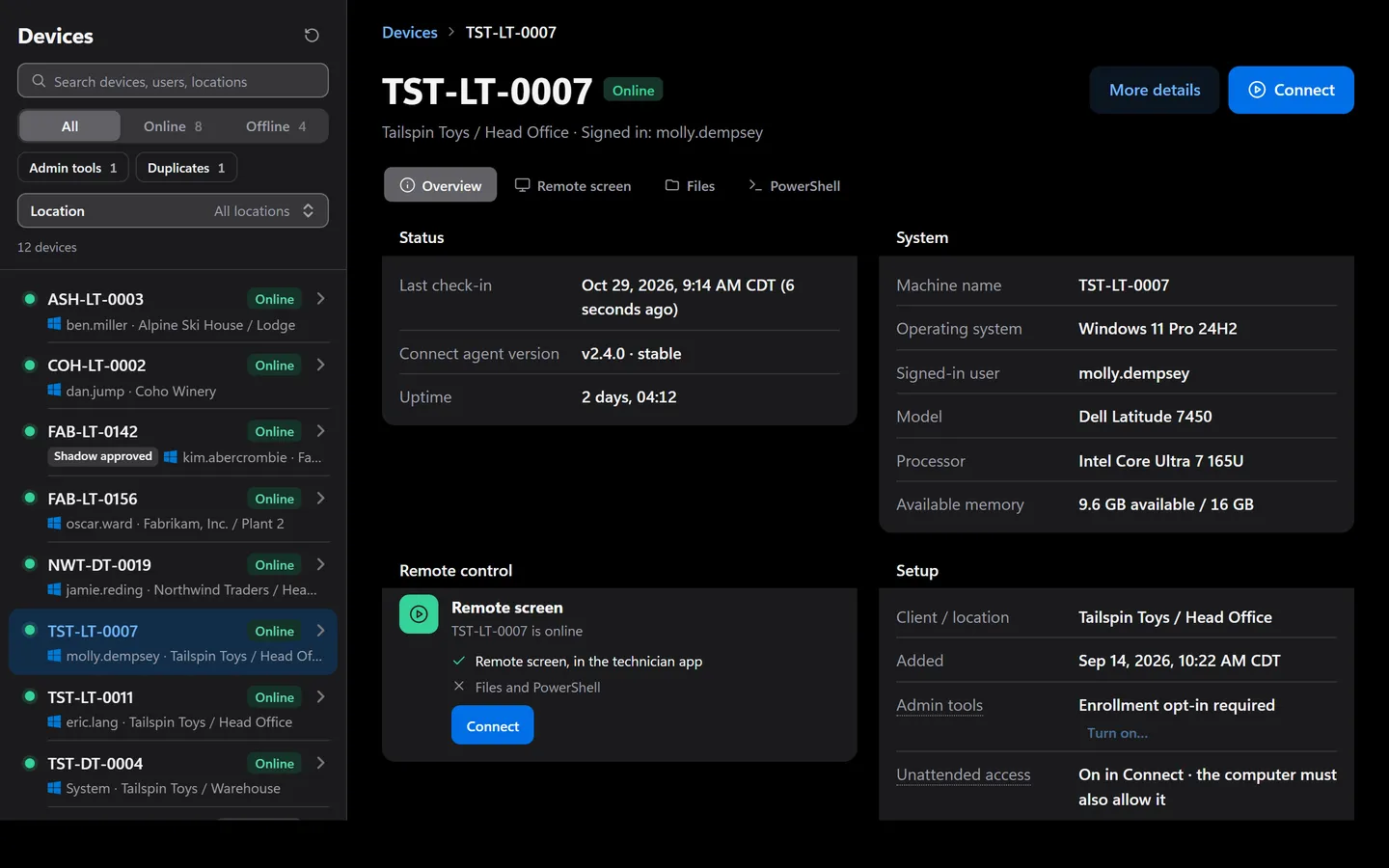
Enroll Windows PCs and Macs into one client and location with installers you can revoke, then see status from signed device check-ins, agent version, operating system, and signed-in user. Installers are not yet code-signed.
Four yeses before anything runs. A no on any side wins.
Security- Your organizationAn Owner or Admin turns AI assist on in Settings. It is off by default and can be paused at once.
- A technicianThe assistant works for a signed-in Owner or Admin. High-risk fixes wait for a technician or admin to approve in Connect; the assistant cannot approve.
- The person at the PCA prompt names the technician and the reason, and Deny is the default. Unattended help is only for computers approved for it.
- The computerA local administrator can turn assist off on the PC. While it works, the session bar shows the assistant, with Stop.
- High-risk fixes wait for a technician or admin to approve in Connect.
- Every request, approval, and result is kept in the audit log.
- For Windows PCs and Macs.
- Accred Connect’s agentic IT support is patent pending in the US.
Questions about Connect
What is Accred Connect?
Accred Connect is remote support for Windows PCs and Macs, built into the Accred suite for MSPs and IT teams.
- Technicians view and take control from Windows or from the Mac technician app, with several people in one session, or work on a Windows PC in a background Shadow session where the user isn’t interrupted.
- Devices are enrolled by client and location, with status and inventory.
- Its patent-pending agentic IT support lets your AI assistant find a person’s PC or Mac, work out what is wrong, and fix it, with high-risk fixes approved in Connect.
- It comes with Consult + Connect seats, and agents install on unlimited computers at no charge.
Who is Accred Connect for?
Choose Connect when you support Windows PCs and Macs for clients or staff and want remote control, background fixes, and AI-assisted support on the same ticket as your Consult support queue.
- Built for: Managed service providers, IT support teams, Help desks on Teams or Slack.
What is the current availability of Accred Connect?
Connect is sold with Consult as Consult + Connect seats, with a 30-day free trial; agents install on unlimited computers at no charge.
- The installers are not yet code-signed: Windows shows an unknown-publisher warning, and macOS may ask you to confirm the Mac installer.
- Shadow is Windows only.
- Online status and inventory come from signed device check-ins.
How much does Accred Connect cost?
Included with Consult + Connect · $29.99 per seat/month · Agents on unlimited computers · Try free for 30 days (5 technicians).
- Connect is sold only with Consult, as Consult + Connect: $29.99 per seat per month, $26.99 from seat 11, or $23.99 per seat per month billed annually, $21.59 from seat 11.
- Technicians (Owners and Admins on a Consult + Connect seat) get Take control, Shadow, and AI assist.
- Agents install on unlimited computers at no charge.
- Try Connect free for 30 days with up to 5 technicians and no card.
- When the trial ends, devices stay connected, but technician tools lock until you buy Consult + Connect seats.
- Fair use: we may contact you above 2,000 devices per technician seat.
How do I get started with Accred Connect?
Create your organization in Hub, or sign in.
- An Owner or Admin starts the Connect free trial, and technicians on Consult + Connect seats take control, shadow, and use AI assist.
- Agents install on unlimited computers.
- The installer is not yet code-signed.
How does Connect fit with the other Accred apps?
Connect owns remote support, device enrollment, and inventory.
- Consult owns the live support queue, client portal, communication records, and time capture.
Is Connect’s AI support patented?
Patent pending in the US. Connect’s agentic IT support lets your AI assistant find a person’s Windows PC or Mac, work out what is wrong, and fix it with a yes from the right people.
- Every step is logged.
Further reading
Every guide- ScreenConnect, TeamViewer, and Accred Connect comparedScreenConnect and TeamViewer are standalone remote support tools. Accred Connect adds remote control, Shadow, and AI-assisted fixes to Consult seats.
- Atera, NinjaOne, and Accred Connect and Devices comparedAtera and NinjaOne are full RMM platforms. Accred Connect adds remote support and AI-assisted fixes to Consult seats; Accred Devices reads Intune per client.
- What is configuration drift in Microsoft 365?Configuration drift is when a Microsoft 365 tenant’s settings move away from the baseline you intended. Common causes, examples, and how to detect it.
- Microsoft 365 software for MSPsWhich MSP jobs Accred covers today, from client delivery and migrations to tenant administration, backup, and licensing, and what is not there yet.
- Microsoft 365 software for internal IT teamsHow an in-house IT team can use Accred to administer its own Microsoft 365 tenant, check Copilot readiness, enroll devices, and plan a tenant migration.
What Connect costs.
$29.99per seat per month, with Consult + Connect
Included with Consult + Connect · $29.99 per seat/month · Agents on unlimited computers · Try free for 30 days (5 technicians). Connect is sold only with Consult, as Consult + Connect: $29.99 per seat per month, $26.99 from seat 11, or $23.99 per seat per month billed annually, $21.59 from seat 11. Technicians (Owners and Admins on a Consult + Connect seat) get Take control, Shadow, and AI assist. Agents install on unlimited computers at no charge. Try Connect free for 30 days with up to 5 technicians and no card. When the trial ends, devices stay connected, but technician tools lock until you buy Consult + Connect seats. Fair use: we may contact you above 2,000 devices per technician seat.