
Accred Protect

Back up Microsoft 365. Restore without overwriting.
Accred Protect is a Microsoft 365 backup and restore app for MSPs and IT teams.
Works with your AI assistantOpen in Hub, priced per protected user
$2.50 per protected user per month, or $2.00 billed annually ($24.00 per protected user per year). No minimum. The card limit is 2,000 protected users. Pay by card in Hub up to the card limit; above it, or to pay by invoice, request a quote in Hub. Storage is included, with a fair-use pooled average of 100 GB per protected user. The 30-day free trial covers up to 25 protected users with no card. An Owner or Admin starts it in Hub. When it ends without a plan, Protect pauses: your backups are kept, but no new backups run until a plan starts. Owners, Admins, and Members can open Protect; Viewers cannot. It backs up Exchange Online mail and OneDrive only: SharePoint and Teams are not covered yet.
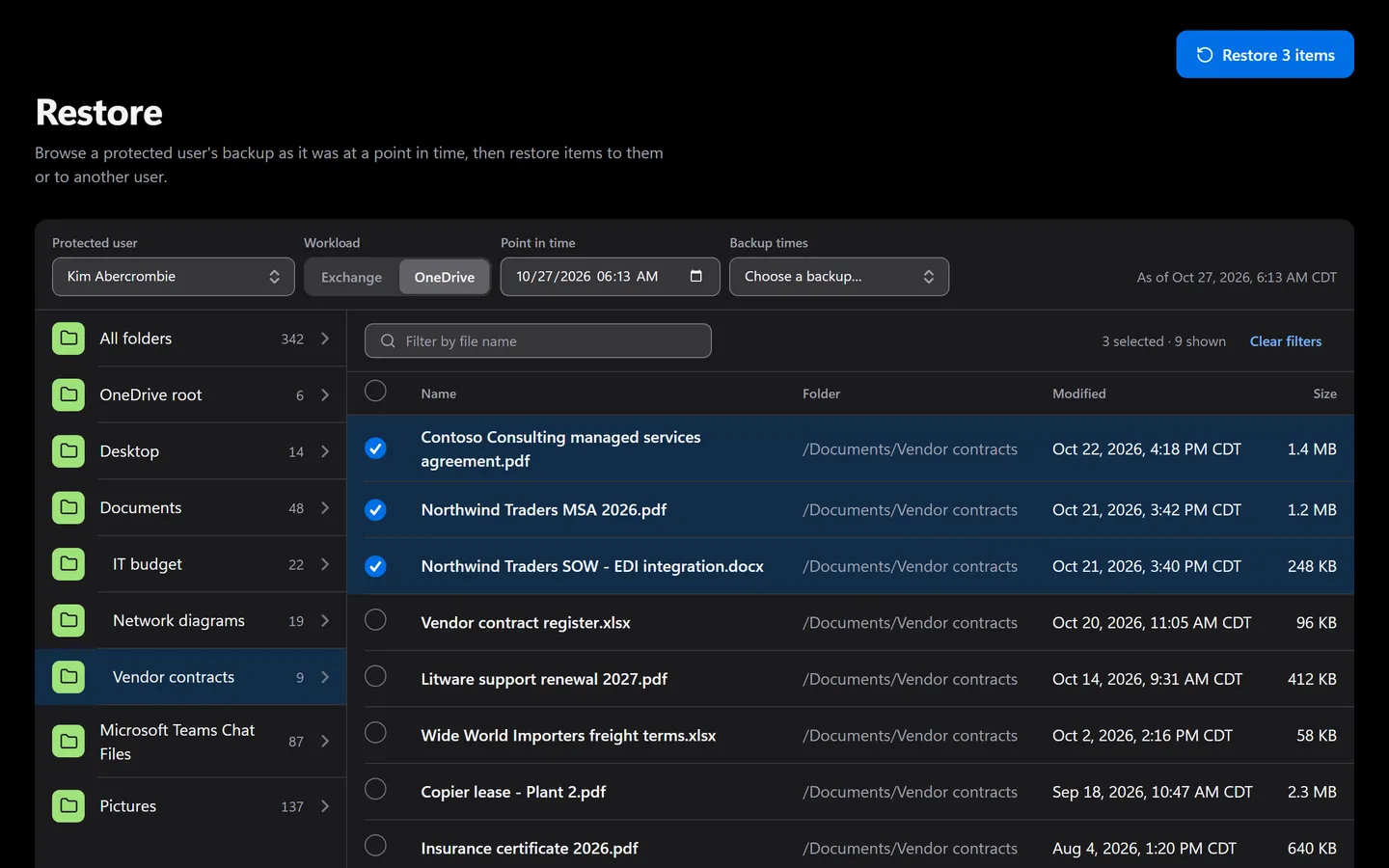
Prefer to click? It’s all in the app too.
Everything the assistant does has a screen. Shown with sample data.
- Pick files and folders to restore
- Every protected user’s backups
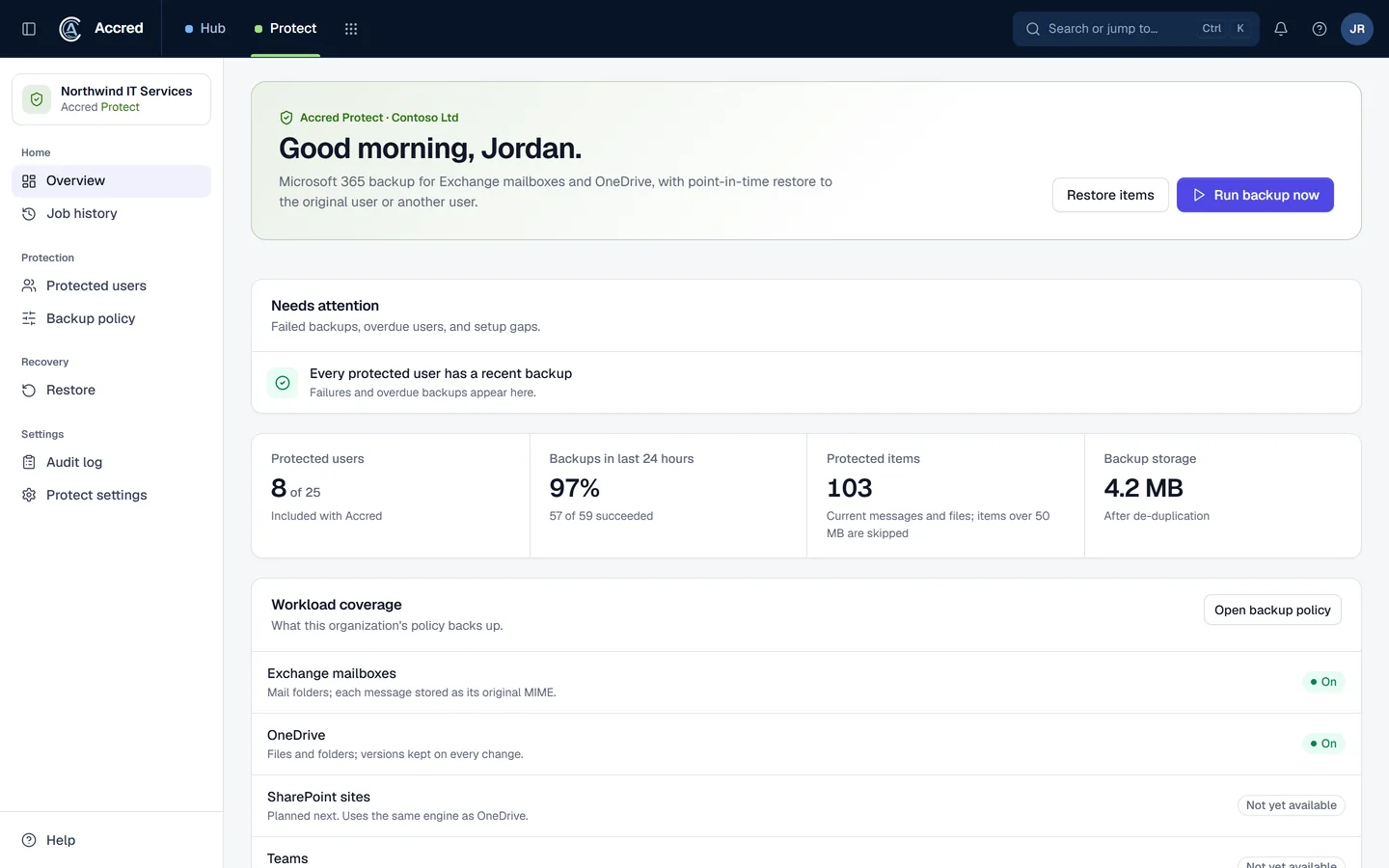
What Protect does today.
Scheduled incremental backup of Exchange Online mailboxes and OneDrive
Point-in-time browse and item-level restore
Restores that never overwrite: items go to a new folder
Job history, attention list, and an append-only audit log
Let the agent do it. You stay in charge.
Ask for a restore in plain language. Restores go to a new folder, so nothing is overwritten.
- You
Restore Jamie’s OneDrive Finance folder from Monday.
- Found the userJamie Reding
- Found the backupFinance folder · Monday backup
- Proposed changeRestore Finance to a new folderYou said yes
- Started the restoreRestore started
- Checked the restoreRestore completed
- Assistant
Restored to a new folder in Jamie’s OneDrive. Nothing was overwritten.
- Ask
- Investigate
- Approve
- Done and logged
Protect audit log
- Restore started by you, via your assistant
- Restore completed
An example with sample data.
Safe to hand over. Your rules, your access, your log.
Security- Your access, nothing moreYour assistant can do what your account can do. Hub checks your role on every request.
- A yes before changesYou choose Read only, or Read and make changes, when you connect. Changes check with you first.
- Logged as youEvery change is recorded in the app’s audit log as made by you, via your assistant.
- Microsoft consent firstNothing connects to a tenant until an administrator grants Microsoft consent.
What Protect backs up today
| Workload | Today | Notes |
|---|---|---|
| Exchange Online mailboxes | Backed up | Mail folders. Calendar and contacts are not included yet. |
| OneDrive | Backed up | Files up to 50 MB; larger files are skipped with a recorded reason. |
| SharePoint sites | Not yet | Shown in the app as not yet available. |
| Teams | Not yet | Shown in the app as not yet available. |
The first backup reads everything; later runs copy only new and changed items. Large first backups finish over several runs and show as Partial until they are complete.
Schedule and retention
- One backup policy per organization: choose Exchange, OneDrive, or both.
- Back up every 4, 8, 12, or 24 hours.
- Keep versions for 30, 90, or 365 days, or 7 years. The current version of an item that still exists is never pruned.
- Pausing the policy stops new runs without deleting anything.
How restore works
- Pick a protected user, a workload, and a date and time. Protect shows each item as it existed then, by folder.
- Select the messages or files you need.
- Restore to the original user or to another user in the same tenant. Before anything is written, the confirmation names the tenant, the target user, the item count, and the destination folder.
- Mail lands in a new folder named "Restored by Accred Protect" with a timestamp; files land in a OneDrive folder of the same name with their original paths. Nothing is overwritten.
Only Owners and Admins can browse backed-up items or restore, because backups hold other people’s mail and files. Every browse and restore is recorded in the audit log.
Where backups are stored
Backup content is stored in Cloudflare R2 and the item index in Cloudflare D1, both encrypted at rest. Each Accred organization’s data is kept under its own prefix, and identical files are stored once. Customer-managed keys and choosing a storage region are planned, not built.
What Protect does not do yet
- SharePoint and Teams backup.
- Calendar, contacts, and tasks.
- Export to PST or ZIP, legal hold, and restore to a different tenant.
- Email or Teams alerts. Problems show on the Overview and in the notifications panel.
If you need SharePoint and Teams backup today, an established product is the safer choice. See the Microsoft 365 backup comparison for how Protect’s scope compares with Veeam, AvePoint, Datto, and Microsoft 365 Backup.
Questions about Protect
Is Accred Protect available?
Yes. Protect opens in Accred Hub. The 30-day free trial covers up to 25 protected users with no card.
- An Owner or Admin starts it in Hub.
- When it ends without a plan, Protect pauses: your backups are kept, but no new backups run until a plan starts.
- It backs up Exchange Online mail and OneDrive; SharePoint and Teams are not covered yet.
Which Microsoft 365 data does Accred Protect back up?
Protect backs up Exchange Online mail folders and OneDrive files.
- SharePoint, Teams, calendar, and contacts are not backed up yet.
Can Accred Protect overwrite my data during a restore?
No. Restores never overwrite.
- Mail goes to a new folder named "Restored by Accred Protect" with a timestamp, and files go to a OneDrive folder of the same name.
How much does Accred Protect cost?
$2.50 per protected user per month, or $2.00 billed annually ($24.00 per protected user per year).
- No minimum. The card limit is 2,000 protected users.
- Pay by card in Hub up to the card limit; above it, or to pay by invoice, request a quote in Hub.
- Storage is included, with a fair-use pooled average of 100 GB per protected user.
Doesn’t Microsoft already back up Microsoft 365?
Microsoft keeps the service available and offers recycle bins and retention features, but deleted-item windows are limited and Microsoft describes protecting your own data as a shared responsibility.
- Microsoft also sells its own Microsoft 365 Backup product.
Further reading
Every guide- Does Microsoft back up Microsoft 365 data? Retention vs backupMicrosoft 365 keeps deleted items for 14 to 93 days and sells a separate backup product. Recovery windows, retention vs backup, and when you need a backup.
- Microsoft 365 backup tools compared: Veeam, AvePoint, Datto, and Microsoft 365 BackupVeeam, AvePoint Cloud Backup, Datto SaaS Protection, and Microsoft 365 Backup compared on workloads, frequency, retention, restore, and price, with sources.
- Microsoft 365 software for MSPsWhich MSP jobs Accred covers today, from client delivery and migrations to tenant administration, backup, and licensing, and what is not there yet.
Sources
- Microsoft 365 Backup FAQ · Microsoft Learn
- Shared responsibility in the cloud · Microsoft Learn
What Protect costs.
$2.50per protected user per month
| Term | Price |
|---|---|
| Monthly | $2.50 per protected user per month |
| Billed annually | $2.00 per protected user per month ($24.00 per protected user per year) |
| Minimum | None |
| How to buy | By card in Hub, up to 2,000 protected users; above that, or to pay by invoice, a quote requested in Hub |
| Free trial | 30 days, up to 25 protected users, no card |
| Storage | Included, with a fair-use pooled average of 100 GB per protected user |
Your plan sets how many users Protect can protect, and an Owner or Admin changes it in Hub Billing. When a trial ends without a plan, Protect pauses: your backups are kept, but no new backups run until an Owner or Admin starts a plan in Hub.
Create your organization, then open Protect.
Protect starts with a 30-day free trial for up to 25 protected users, with no card. Then it is $2.50 per protected user per month, or $2.00 billed annually. Hub is free.