
Accred Devices

Intune devices, compliance, and updates in one place.
Accred Devices is an Intune endpoint management app for MSPs and IT teams.
Works with your AI assistantOpen in Hub, priced per managed device
$1.50 per managed device per month, or $1.20 billed annually ($14.40 per managed device per year). No minimum. The card limit is 2,000 managed devices. Pay by card in Hub up to the card limit; above it, or to pay by invoice, request a quote in Hub. The 30-day free trial covers up to 25 managed devices with no card. An Owner or Admin starts it in Hub.
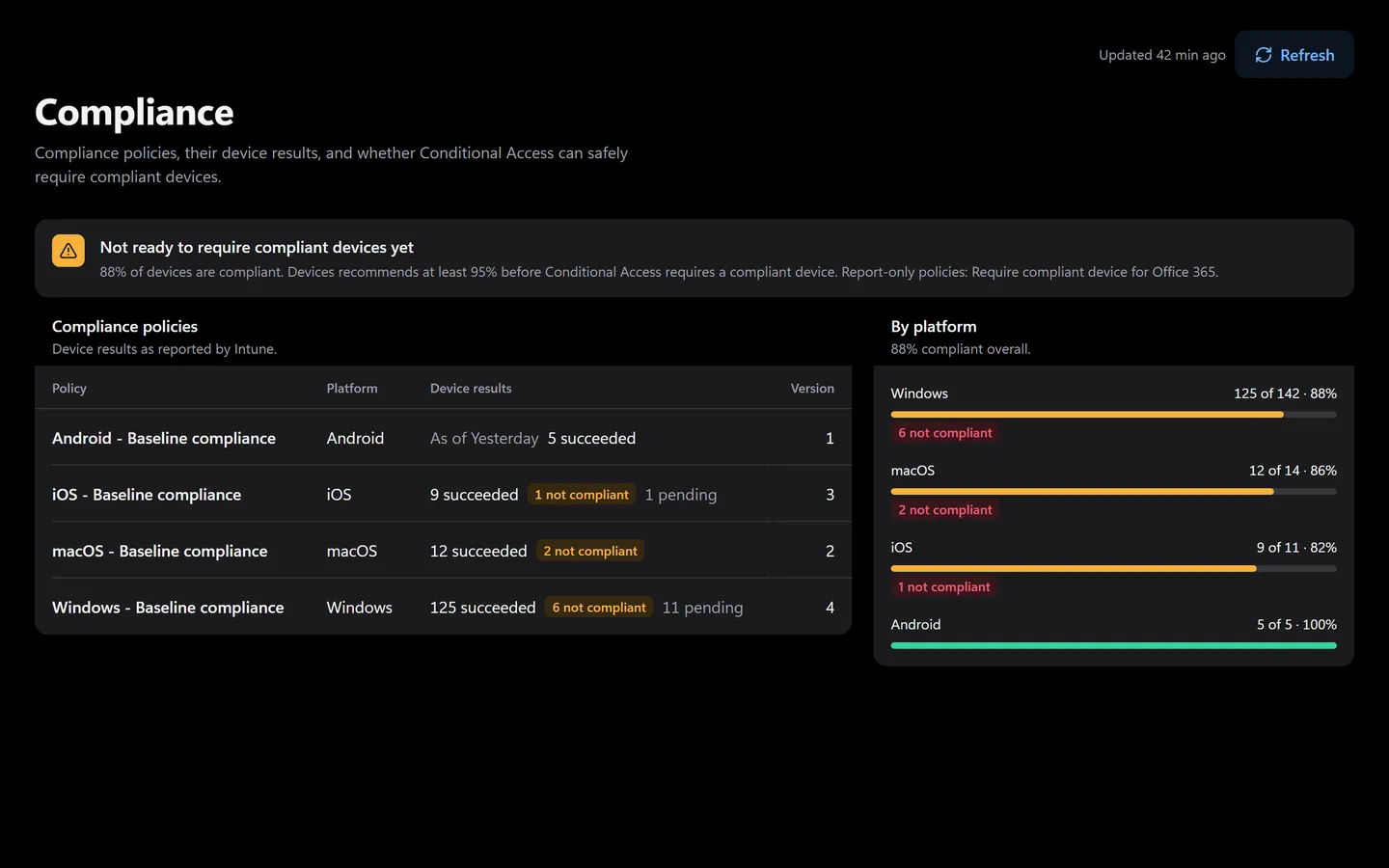
Prefer to click? It’s all in the app too.
Everything the assistant does has a screen. Shown with sample data.
- How many devices meet each policy
- For every client tenant
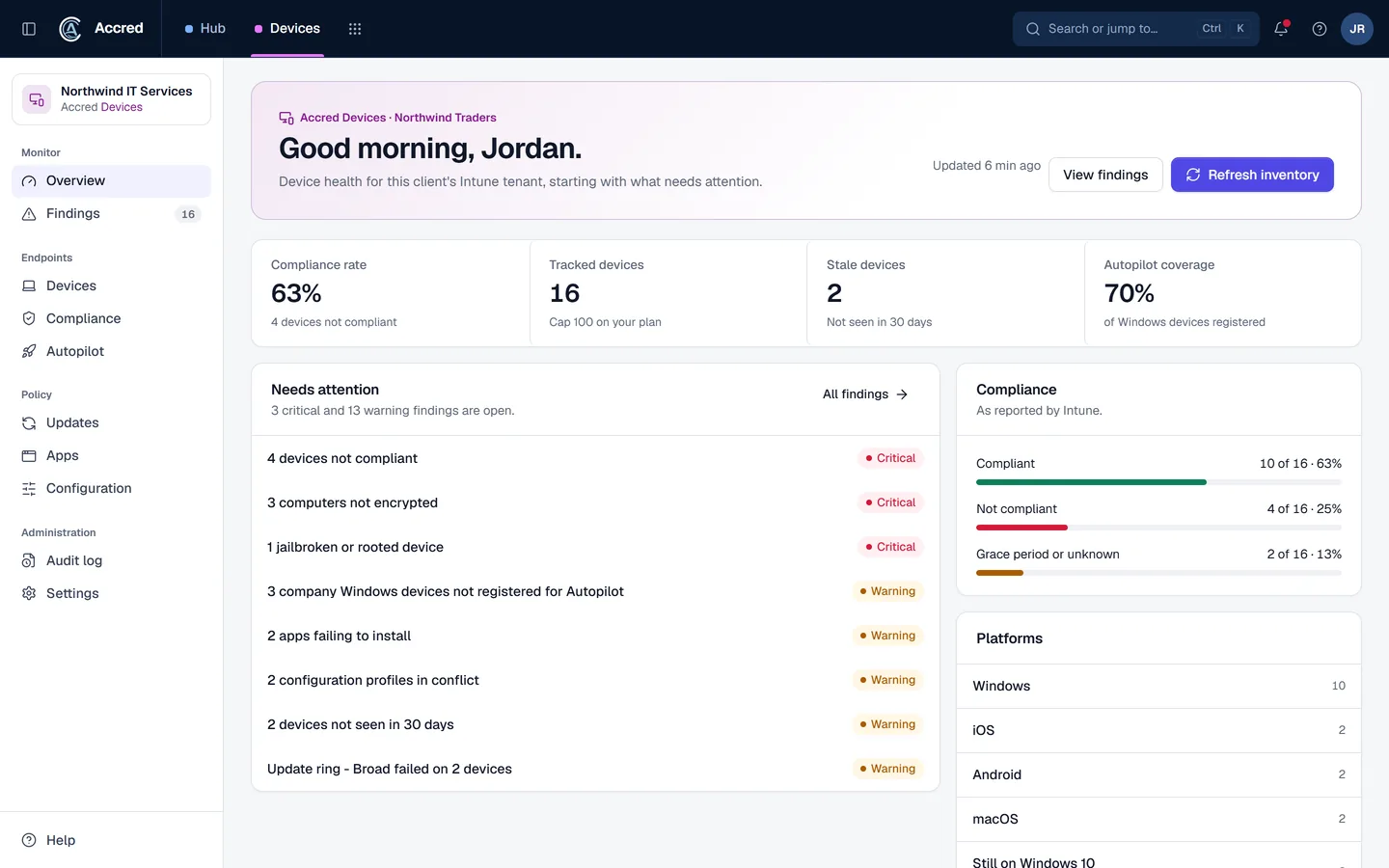
What Devices does today.
Intune device inventory per client tenant
Compliance, encryption, and stale-device findings
Windows Autopilot registration and enrollment findings
Update ring, app, and configuration findings with remediation steps
Let the agent do it. You stay in charge.
Ask which devices are out of compliance, then sync them. Your assistant works through your Intune connection, as you.
- You
Which Contoso laptops are out of compliance? Sync them.
- Checked compliancePolicies by platform
- Listed devicesDevices not meeting policy
- Proposed changeSync those devices with IntuneYou said yes
- Synced the deviceSync sent
- Assistant
Sync sent. Here are the devices and the policy each one misses.
- Ask
- Investigate
- Approve
- Done and logged
Devices audit log
- Device sync sent by you, via your assistant
An example with sample data.
Safe to hand over. Your rules, your access, your log.
Security- Your access, nothing moreYour assistant can do what your account can do. Hub checks your role on every request.
- A yes before changesYou choose Read only, or Read and make changes, when you connect. Changes check with you first.
- Logged as youEvery change is recorded in the app’s audit log as made by you, via your assistant.
- Microsoft consent firstNothing connects to a tenant until an administrator grants Microsoft consent.
Examples of what Devices flags
| Area | Example findings |
|---|---|
| Compliance | Devices not compliant, in a grace period, or with unknown compliance; no compliance policies at all. |
| Security | Computers without disk encryption; jailbroken or rooted phones. |
| Autopilot | Company Windows devices not registered; failed enrollments; registrations never used. |
| Updates | Devices still on Windows 10 or below a minimum Windows 11 build; no update rings. |
| Inventory | Devices not seen for a set number of days; personal phones fully enrolled. |
| Conditional Access | Whether devices are ready for compliance-based Conditional Access. |
Findings use the same model as Accred Manage: critical, warning, or info, and open, accepted risk, or resolved.
Where Devices fits
Accred Manage already lists Intune devices as part of tenant administration. Devices goes deeper on endpoints for MSPs that run Intune for clients. Accred Connect is different again: it enrolls Windows PCs and Macs with its own agent for inventory and, later, remote support.
Questions about Devices
Is Accred Devices available?
Yes. Devices opens in Accred Hub. The 30-day free trial covers up to 25 managed devices with no card.
- An Owner or Admin starts it in Hub.
How much does Accred Devices cost?
$1.50 per managed device per month, or $1.20 billed annually ($14.40 per managed device per year).
- No minimum. The card limit is 2,000 managed devices.
- Pay by card in Hub up to the card limit; above it, or to pay by invoice, request a quote in Hub.
Does Accred Devices replace Microsoft Intune?
No. Devices reads the Intune data a client tenant already has and turns it into findings.
- Intune remains the management service.
How is Accred Devices different from Accred Connect?
Devices works from Microsoft Intune data in a client tenant.
- Connect installs its own agent on Windows PCs and Macs for remote support and inventory.
Further reading
Every guide- What is configuration drift in Microsoft 365?Configuration drift is when a Microsoft 365 tenant’s settings move away from the baseline you intended. Common causes, examples, and how to detect it.
- Accred ConnectAccred Connect: remote support for Windows PCs and Macs, with Take control, Shadow, and patent-pending AI-assisted fixes. Sold as Consult + Connect per seat.
- Microsoft 365 software for MSPsWhich MSP jobs Accred covers today, from client delivery and migrations to tenant administration, backup, and licensing, and what is not there yet.
What Devices costs.
$1.50per managed device per month
| Term | Price |
|---|---|
| Monthly | $1.50 per managed device per month |
| Billed annually | $1.20 per managed device per month ($14.40 per managed device per year) |
| Minimum | None |
| How to buy | By card in Hub, up to 2,000 managed devices; above that, or to pay by invoice, a quote requested in Hub |
| Free trial | 30 days, up to 25 managed devices, no card |
Devices reads the Intune data a client tenant already has, so it runs on the client’s own Intune license. When a trial ends without a plan, Devices pauses and the data stays; an Owner or Admin starts a plan in Hub.
Create your organization, then open Devices.
Devices starts with a 30-day free trial for up to 25 managed devices, with no card. Then it is $1.50 per managed device per month, or $1.20 billed annually. Hub is free.